






Updated
Free option comparison tool
Compare options with a weighted decision matrix
Define what matters, weight each criterion and score every option against the same evidence-based standard.
The matrix shows how every score contributes to the final ranking, making complex choices easier to explain, challenge and revisit. Drafts and completed decisions stay in your browser.
Weighted comparison tool
Build your weighted decision matrix
Define the decision, add positive criteria, weight their importance and score each shortlisted option.
Work in progress
Auto-saved work found
Continue the decision saved automatically in this browser, or discard it and begin with a blank tool.
% complete
Define the criteria
Add the positive qualities a successful choice should possess. Use at least three and no more than ten.
of 10 criteria added; at least 3 required.
Weight each criterion
Choose from 0 (not important) to 10 (essential). These weights apply equally to every option.
Add the options
Add between two and six realistic contenders that can be judged against the same criteria.
of 6 options added; at least 2 required.
option of
Score this option from 0 (does not meet the criterion) to 10 (meets it extremely well).
Criterion weight:
Question
Weighted result
The matrix cannot recommend a winner because two or more options share the highest total. Review the weights and scores until they accurately distinguish the leading choices.
Ranking
Calculation breakdown
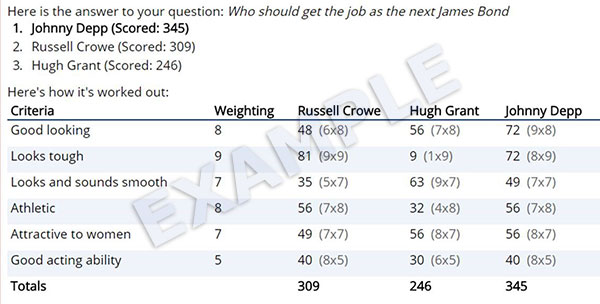
Each cell shows score × criterion weight.
| Criterion | Weight | |
|---|---|---|
| × = | ||
| Total | ||
Save this decision
Saved decisions stay in this browser. They are not uploaded or synchronised.
Stored on this device
Saved decision matrices
Reopen and edit completed option comparisons stored in this browser.
Browser storage is unavailable. You can still use the tools, but work cannot be restored after leaving the page.
No saved decisions yet. Complete one of the tools and choose Save decision to keep it in this browser.
Which one or what kind?
When to use a decision matrix
Use a weighted matrix when you have several realistic options and no single fact determines the choice. Typical examples include selecting a supplier, choosing software, comparing locations or deciding which project approach to adopt.
The method is strongest when every option can be assessed against the same positive criteria. First decide what a successful choice would look like, then compare the contenders against that definition.
If your question only has two answers, the simpler Yes or No tool may be more appropriate. If you are ordering tasks rather than selecting one option, use the task prioritisation tool.
Build a defensible comparison
Three parts of a useful matrix
Positive criteria
Describe what you want rather than what you dislike. Criteria such as reliable support or low lifetime cost are easier to score consistently.
Relative importance
Not every criterion matters equally. Weighting stops attractive but secondary features from overwhelming essential requirements.
Consistent evidence
Score every contender against the same definition and evidence. Avoid changing the standard to favour a preferred option.
Make the decision
Use the ranking to select the best option
The option ranked first is the recommended choice because it achieves the strongest total against your weighted criteria. The calculation breakdown shows exactly where that advantage comes from.
Before committing, verify the criteria with the highest weights and the scores that created the lead. Correct any score that is based on assumption rather than evidence, then recalculate.
If the leading position remains stable after that check, select the top option and record the immediate next action. If the lead is tied, gather the missing evidence or clarify which criterion matters most; the current matrix does not justify choosing one contender over another.
Questions answered
Weighted decision matrix FAQ
A weighted decision matrix compares several options against the same criteria. Each criterion receives an importance weight, each option receives an evidence score, and the weighted totals reveal which option best fits the priorities you defined.
This tool supports three to ten criteria and two to six options. Keeping the shortlist focused makes the scoring easier to justify and review.
A weight expresses how important a criterion is to the decision. A score expresses how well a particular option meets that criterion. The tool multiplies the two values before calculating each total.
Review the evidence scores and criterion weights. A tied lead means the current inputs do not distinguish the options, so the tool does not select an arbitrary winner.
Yes. You can save a completed matrix in local browser storage and reopen it later on the same browser and device.